
Contracts & Registration
SPAs drafted, signed and registered, without retyping.
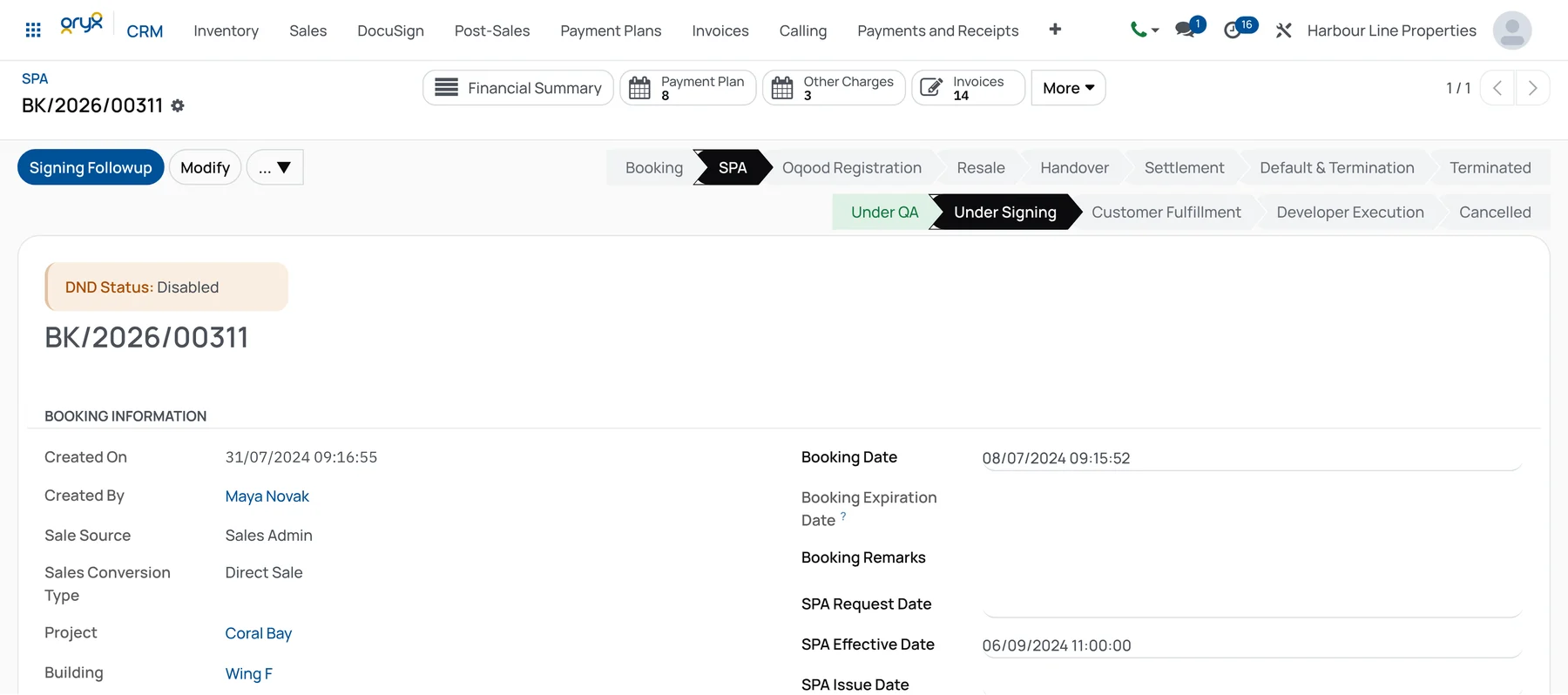
Oryx Contracts & Registration produces reservation agreements and SPAs in English and Arabic from your own Word templates, sends them for DocuSign signature in the order you set, and tracks Oqood registration for Dubai and Ras Al Khaimah to the certificate.
- Checked first
AI reads IDs and documents and checks them against the booking. People approve.
- Signed digitally
English and Arabic contracts from your templates, signed through DocuSign in the right order.
- Registered
Oqood tracked to the certificate, for Dubai and Ras Al Khaimah.
What changes for your team.
| Today | With Oryx |
|---|---|
| Each SPA is copied from the last one and edited by hand. | Your Word templates fill every contract from the booking. |
| Signed copies are checked by eye, if they are checked at all. | AI compares the signature with the buyer's ID and the contract with the booking. A person approves. |
| Oqood status is a column in someone's spreadsheet. | Each Oqood step is tracked on the booking, with its documents and fees. |
How Contracts & Registration works.
Reservation agreements, SPAs and Oqood registration on one record, checked before anyone approves.
- 1Generate
The reservation agreement and SPA are filled from the booking using your Word templates and merge fields, in English and Arabic.
- 2Check
Before approval, AI reads the documents and IDs and flags anything that does not match the booking. Your QA team decides.
- 3Sign
DocuSign sends the contract to the buyer and then to your signatories, in the order you set for each step.
- 4Verify
On the signed contract, the buyer's signature is checked against their Emirates ID or passport.
- 5Register
The Oqood stage tracks every step to the certificate, with documents and fees on the booking.
What's included
- Word templates with merge fields
- English and Arabic contracts
- DocuSign signing order per step
- AI contract check before approval
- AI signature check against the ID
- Oqood for Dubai and RAK
- Password-protected PDFs
Works with
- DocuSign
- Microsoft Word templates
- Sales & Bookings
- Collections
In the UAE
- Dubai and Ras Al Khaimah
Dubai bookings follow the Oqood steps. Ras Al Khaimah projects follow their own registration path, with the signature undertaking letter.
- Arabic contracts
English and Arabic versions come from the same booking data, so the two never disagree.
- Protected documents
Contracts can go out as password-protected PDFs, and cancelled ones are watermarked.
Who uses it
- Contracts adminGenerates contracts and follows signatures.
- QA reviewerApproves after the AI check.
- Authorised signatorySigns for the developer in DocuSign.
- Registration officerMoves each booking through Oqood.
See Contracts & Registration on your kind of project. We set up sample data like a UAE off-plan launch and show the steps your team runs.
Meet UsContracts & Registration questions.
Can we use our own contract templates?
Yes. Your legal team keeps its Word templates. Oryx fills the merge fields from the booking, in English and Arabic.
Does Oryx register the Oqood with DLD for us?
Your team completes the registration on DLD's own system. Oryx keeps every step, document and fee on the booking, so you always know where each registration stands.
Does it support Ras Al Khaimah projects?
Yes. Ras Al Khaimah has its own registration path in Oryx, including the signature undertaking letter.
Which e-signature service do you use?
DocuSign, with a signing order you set for each step, for example the buyer first and then your authorised signatory.
Does AI approve contracts?
No. AI checks documents, IDs and signatures and flags what does not match. A person makes every approval.
Can contracts be password protected?
Yes. Contracts can be sent as password-protected PDFs.
See your next launch on Oryx.
We show the solutions you pick, on sample data set up like a UAE off-plan project. We reply within one working day.
- No preparation needed
- Your solutions first
- A written proposal after